
Helpers
Following is the list of globally available helpers within Jig templates. Since Jig is focused on code generation rather than HTML rendering, these helpers are oriented toward text manipulation and formatting.
truncate
Truncate a string value to a given number of characters. For example:
{{
  truncate(
    'This is a very long sentence that i would like to be shortened',
    18
  )
}}

<!-- Output: This is a very long... -->
The truncate method doesn't chop the words in between and let them get completed. However, you can turn off this behavior by disabling the completeWords option.
{{
  truncate(
    'This is a very long sentence that i would like to be shortened',
    18,
    { completeWords: false }
  )
}}

<!-- Output: This is a very lon... -->
Also, you can define a custom suffix for the truncated string.
{{
  truncate(
    'This is a very long sentence that i would like to be shortened',
    18,
    { suffix: ' [Read more]' }
  )
}}

<!-- Output: This is a very long [Read more] -->
excerpt
The excerpt method is similar to the truncate method. However, this method first removes the HTML tags, truncates the string and returns back plain text. Therefore, it is more suitable, if you want to generate an excerpt from HTML contents.
{{
  excerpt(
    '<p> Hello, this is a dummy <strong> post </strong> </p>',
    20
  )
}}

<!-- Output: Hello, this is a dummy... -->
You can disable completeWords option to perform strict truncation.
{{
  excerpt(
    '<p> Hello, this is a dummy <strong> post </strong> </p>',
    20,
    { completeWords: false }
  )
}}

<!-- Output: Hello, this is a du... -->
Finally, you also provide a suffix to use.
{{
  excerpt(
    '<p> Hello, this is a dummy <strong> post </strong> </p>',
    20,
    { suffix: ' [Read more]' }
  )
}}

<!-- Output: Hello, this is a dummy [Read more] -->
inspect
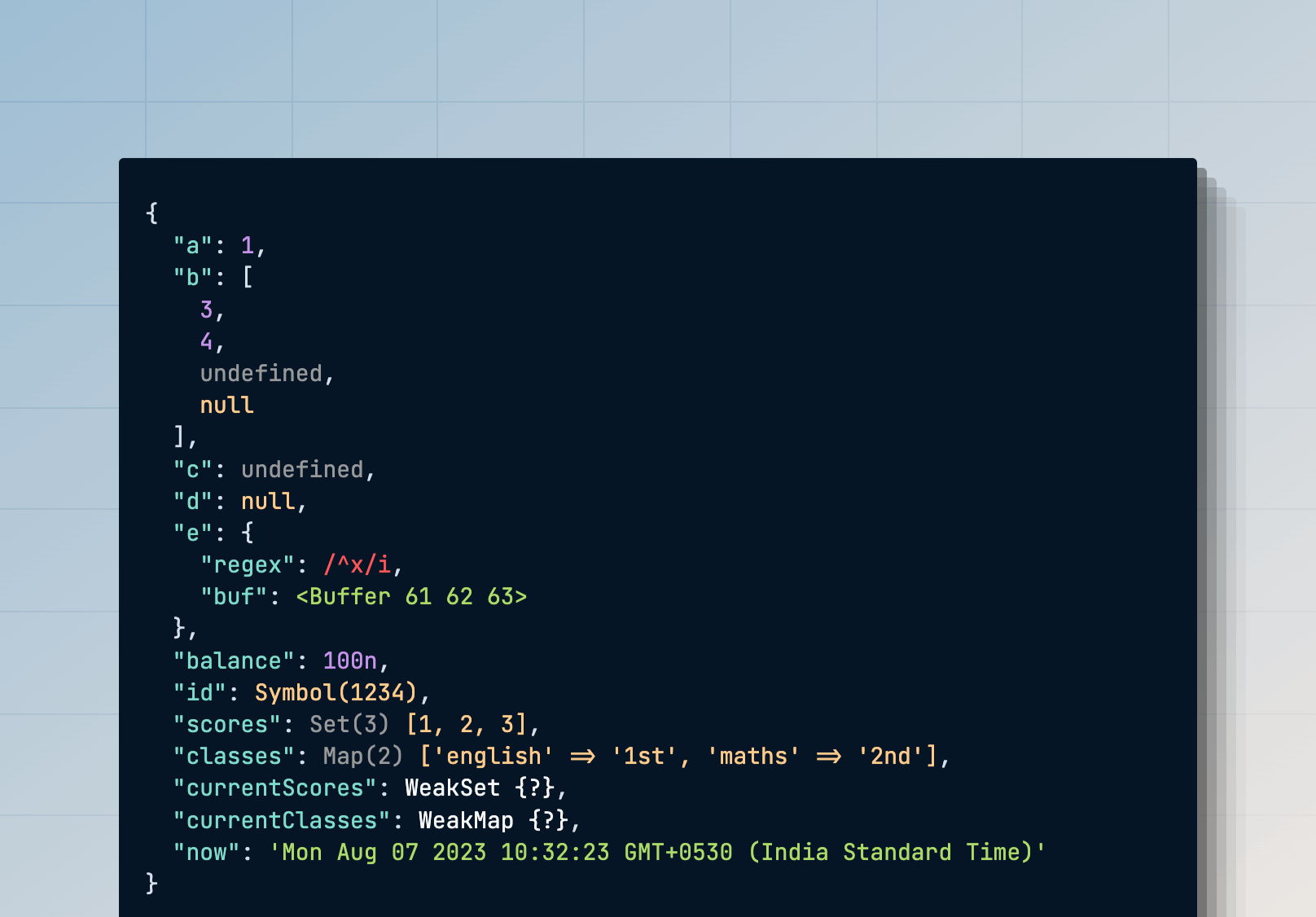
You can use the inspect method to pretty print a value for debugging. The inspect helper returns HTML, which you must view in a browser for better readability.
{{
  inspect({
    a: 1,
    b: [3, 4, undefined, null],
    c: undefined,
    d: null,
    e: {
      regex: /^x/i,
      buf: Buffer.from('abc'),
    },
    balance: BigInt(100),
    id: Symbol('1234'),
    scores: new Set([1, 2, 3]),
    classes: new Map([['english', '1st'], ['maths', '2nd']]),
    currentScores: new WeakSet([[1, 2, 3]]),
    currentClasses: new WeakMap([[['english', '1st'], ['maths', '2nd']]]),
    now: new Date()
  })
}}
Output
Changing case
You can use one of the following methods to transform a string case.
{{ camelCase('hello-world') }}     // Output: helloWorld
{{ snakeCase('hello-world') }}     // Output: hello_world
{{ dashCase('HelloWorld') }}       // Output: hello-world
{{ pascalCase('hello-world') }}    // Output: HelloWorld
{{ capitalCase('hello-world') }}   // Output: Hello-World
{{ sentenceCase('hello-world') }}  // Output: Hello world
{{ dotCase('hello-world') }}       // Output: hello.world
{{ noCase('hello-world') }}        // Output: hello world
{{ titleCase('hello-world') }}     // Output: Hello-World